Today we present the review of the TV-Box model MECOOL M8S PRO L an interesting device since it optionally has a voice remote control compatible with Google Assistant integrated in the Android TV system that comes by default. A device that integrates the powerful S912 Octa core SoC and has 3 GB of RAM, a set that moves any app in a fluid way. Undoubtedly an important point in this model is that it includes DRM Google Widevine L1 certificate and allows us to see Netflix for example in FullHD quality, something that undoubtedly adds value, it also serves as a 4K@60fps multimedia player with support for HDR files. Let’s see how it behaves in our review and how it is perform in all scenarios.
- WARNING: This model has several versions that are identified with the sticker of its bottom, LS, LQ, LB, LP … it is possible that they are not compatible among them at the firmware level, we recommend not to update it if is not necessary.
|
 |
SPECIFICATIONS
| Model | MECOOL M8S PRO L (Version LS) |
| CPU | Amlogic S912 Octa Core Cortex-A53 @ 2 GHz |
| GPU | Mali-T820MP3 |
| OS | Android TV 7 (32bit) |
| RAM | 3 GB DDR3 |
| Storage | 16 GB eMMc |
| WiFi | WiFi a/b/g/n – 2.4/5GHz |
| Bluetooth | 4.1 |
| Ports | 2x USB 2.0 microSD reader HDMI 2.0 AV jack Ethernet 10/100 |
| Others | Status Led |
| Content | Voice Remote + IR HDMI cable 5V 2A DC adapter (10W) Manual Measures: 4.02 x 4.02 x 0.83 inches Weight: 4,8 oz |
CONTENT DESCRIPTION
Package content
The TV-Box MECOOL M8S PRO L comes in a cardboard box with a generic name on top. Inside the box we find the mini TV-Box in an upper compartment, the rest of the accessories are in a lower area, a Bluetooth remote with microphone, HDMI cable, English manual and a 5V 2A adapter.

Product Details
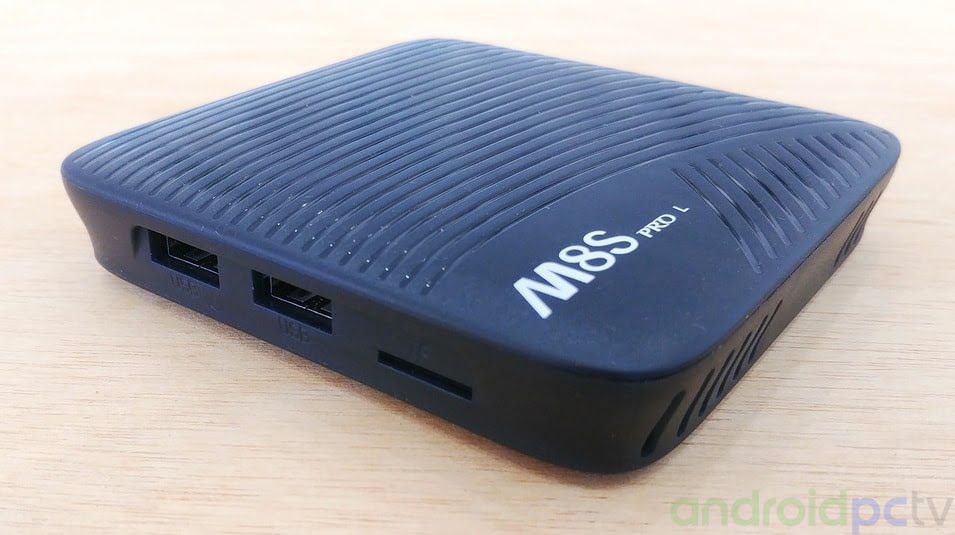
As we can see the box of the MECOOL M8S PRO L is made of plastic and on the top we have a striped decoration, on the front we have a status LED and an IR receiver hidden behind the slots of the box.

In one of its sides we have a microSD card reader with self-extracting mechanism and two USB 2.0 ports. In the perimeter we have a series of ventilation slots but in the upper part we miss more ventilation slots to improve the thermals.
In the back we have all the other ports, DC connector, HDMI 2.0 connector that allows 4K@60fps, also a 10/100 Ethernet port and AV video / audio jack.
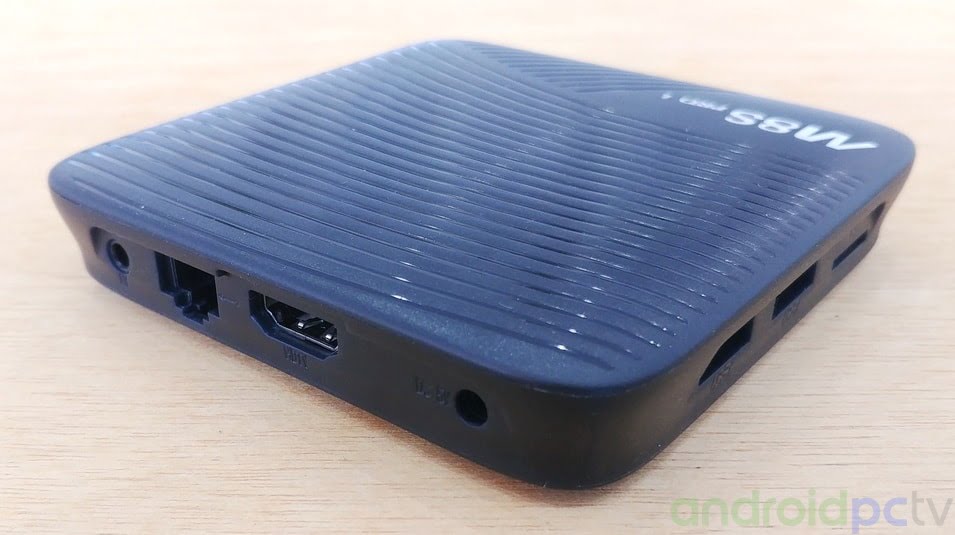
In the lower part of the MECOOL M8S PRO L we have four rubber feet, the sticker that identify the model and several ventilation slots that allow air to enter.

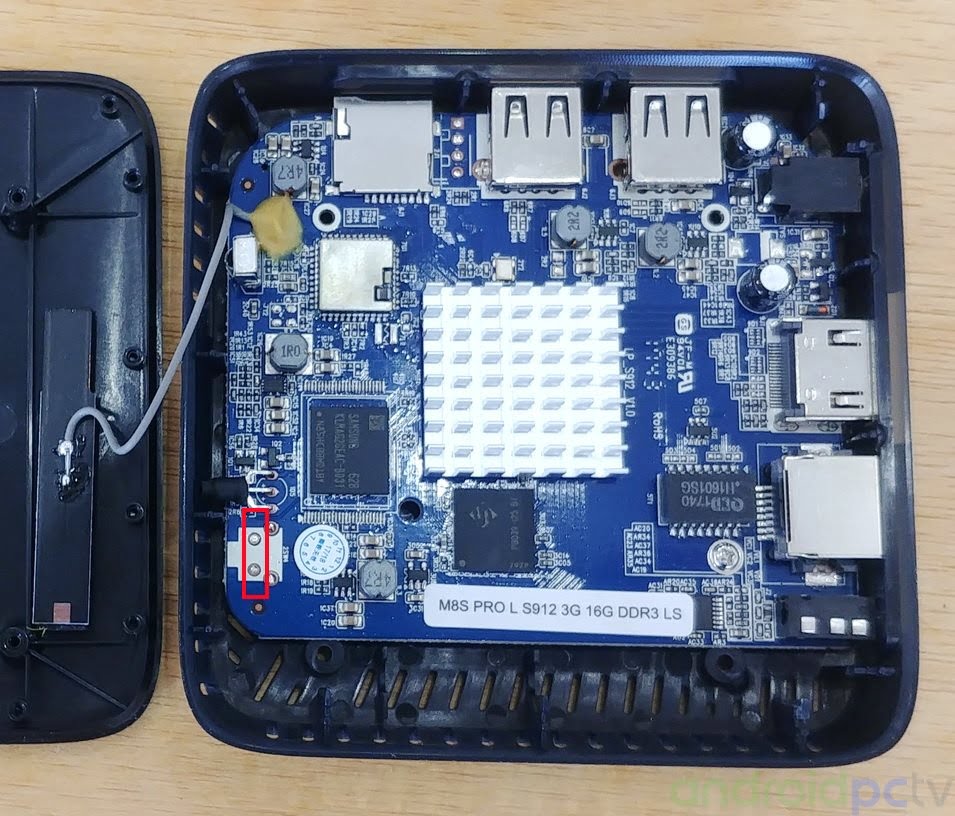
If we open the MECOOL M8S PRO L box we observe the small aluminum radiator and the different components, it is necessary to highlight that we do not have a reset button to reach the flash mode, so we will have to bridge with something metallic in the two points indicated in the photograph.
CONNECTING THE DEVICE
Connection and desktops
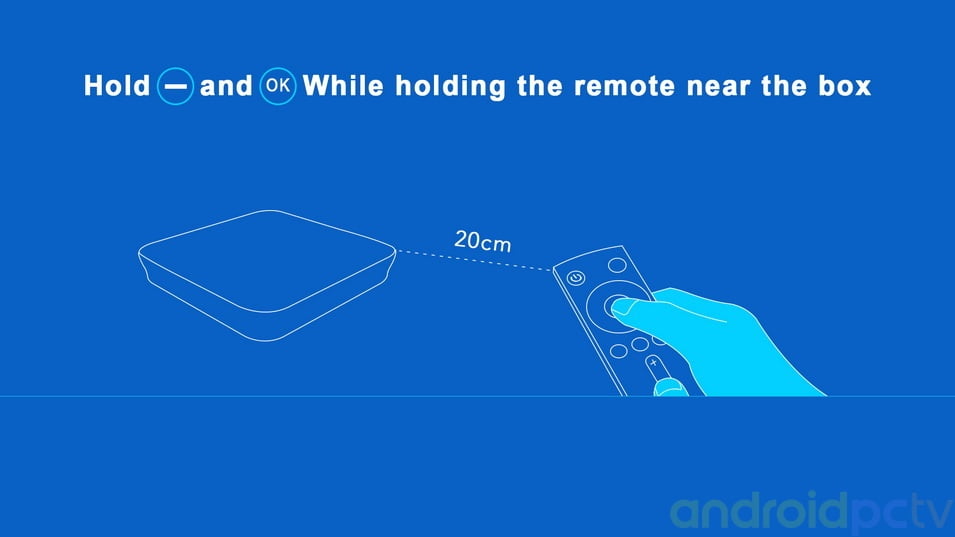
We connect the MECOOL M8S PRO L adapter to the power supply and it starts up directly, the first thing we find is a wizard that guides us to connect the Bluetooth remote by pressing the – and OK key at the same time. The rest of the steps are the classics of Android TV to enter our Google account and connect to Wifi.
Once we have passed the setup wizard we arrived at the Android TV 7.1 environment, we have the classic rows design, in the first one we have the highlighted contents that change dynamically, in the second shortcuts and in the last configuration elements.
- Boot time: 21 seconds

If we leave pressed the microphone button on the remote control Google Assistant is activated and we can give direct indications or commands to search for contents or launch applications, we will always need a little practice to use it, we can put it in other languages.
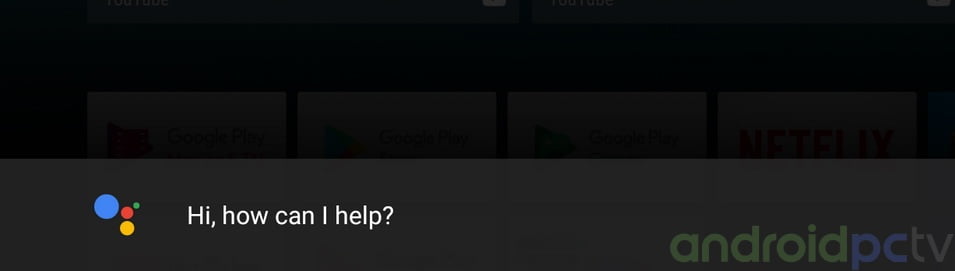
Being an Android TV system this environment does NOT have navigation bar or notification bar, we can only customize the number of bars of recommended items on the home screen.

The installed applications by default are the classic ones of this system, we have Miracast and Airpin that allows us to share the screen of our mobile, Play Store, Classic Youtube and Kids, StbEmu if we have contracted IPTV, TVCenter (Kodi), store of apps Aptoide TV, MX Player, Netflix app for Android TV and update app.

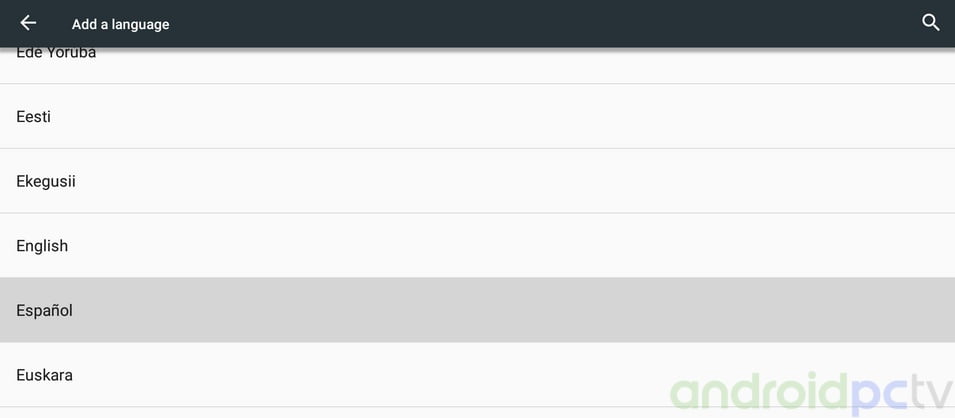
Within the language settings we have all the classic Android languages, we can change to another language without problems.
User Experience
The performance of the MECOOL M8S PRO L TV-Box is correct thanks to the powerful Amlogic S912 Octa Core processor that moves the system well thanks to its 3 GB of RAM that allows you to load quite a few apps or navigation tabs. If we leave the home button of the remote control pressed, we can change the active app without problems. At a thermal level in normal use we have no loss of performance, only a certain drop in performance is noticed if we start playing powerful games in 3D.

Android Settings
By default in the MECOOL M8S PRO L we have two different settings, on the one hand we see the classic TV-Box settings on the side that give us access to several specific aspects of this format.

If we click on More Settings we get to the Classic Settings of Android we have some options more than in the previous settings but they are quite limited and it seems that some menus have been cut that would have allowed us to fine-tune the system.

Android System
The default system in the MECOOL M8S PRO L is the Android TV 7.1.1, a fairly modern system today. The kernel as we see is the version 3.14.29 and the compilation is dated 02-05-2018. With this version we have made the review that you can read in the following pages.
- This model is compatible with Tanix Dual OS firmware

Brand Support
The Mecool brand does not have any support or web available for users, we only get the firmware when they are published on the network and we share them from our website, luckily as we have seen there is a quite active community that works on the custom firmware scene.

Storage and RAM
The TV-Box MECOOL M8S PRO L includes 16 GB of eMMc storage memory, from this storage memory we have actually available about 11 GB, a figure enough to install a good number of apps. As a device with AMLogic SoC this has a single partition in the storage memory which facilitates the management of our files.
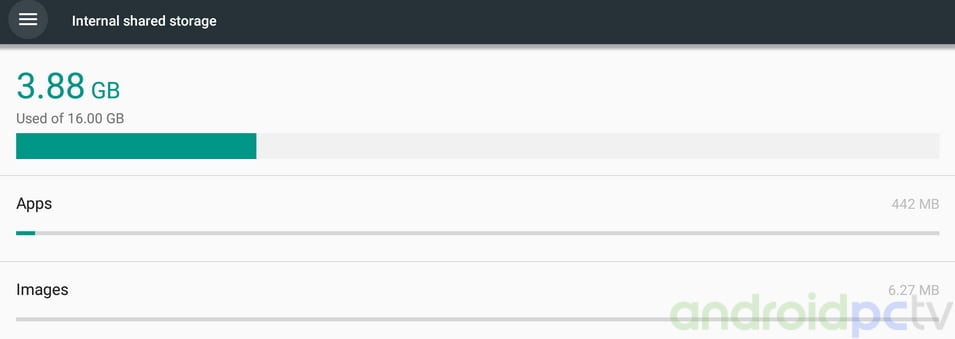
As we have check we also have 3 GB of DDR3 RAM and 1.9 GB that are free after a long navigation through the system, so it allows us to correctly open several tabs in a browser.

We check the memory and internal storage testing the hardware that is integrated in this device, we used the SD bench app as usual. The results of the MECOOL M8S PRO L give us correct values for this kind of hardware.

Consumption and temperatures
In the terms of power consumption the MECOOL M8S PRO L with the S912 SoC shows results within the range of other devices, even putting the SoC to the brim with games with 3D graphics only 6,5 W peak is reached.

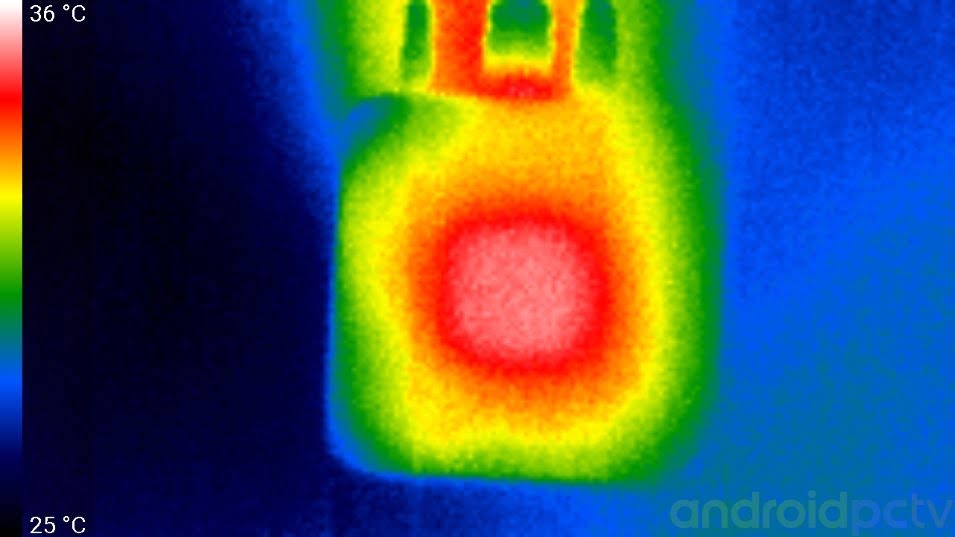
One of the controversial points of this model is its temperature, we have paid special attention to this aspect, in a test of loss of performance we can see how the yield drops by 20% if we keep it to the maximum and reach 80ºC, in an normal use the SoC remains at about 65ºC something quite common.

The box with his design does not help much in the thermal aspect, the heat is concentrated in the upper part that does not have any ventilation slots, if we are somewhat skilled we can make holes to improve the ventilation.
Google Play and Amazon App Store
We conducted several searches in the Google Play store observed that we have no compatibility problems, as we will always be limited by the catalog of Android TV apps. As an alternative we can use the Apptoide TV app or the Amazon appstore to install the classic Android apps that we will not find on Android TV.

Root
The MECOOL M8S PRO L firmware has root activated by default, something that can cause us problems with apps that block this type of permissions.

Power Off / Standby / Power On
If we leave the MECOOL M8S PRO L control button pressed down, it offers us a menu with which we can completely turn off the device. If we want to change this behavior in the TV-Box settings, we have a menu with several options.

MEDIA CONNECTIONS
Video and audio connections.
Intalled in the MECOOL M8S PRO L we have the classic Amlogic S912 SoC a product that has video output support for HDMI 2.0 and we can have a maximum resolution of 4K@60fps with 10bit color and HDR support. We also do not have image quality controls like brightness, contrast or gamma. This system don’t have automatic refresh option something that would be interesting since it avoids us to play content with the annoying Judder effect. We can change the size of the mouse pointer and the captions aspect of several streaming services following our guide.
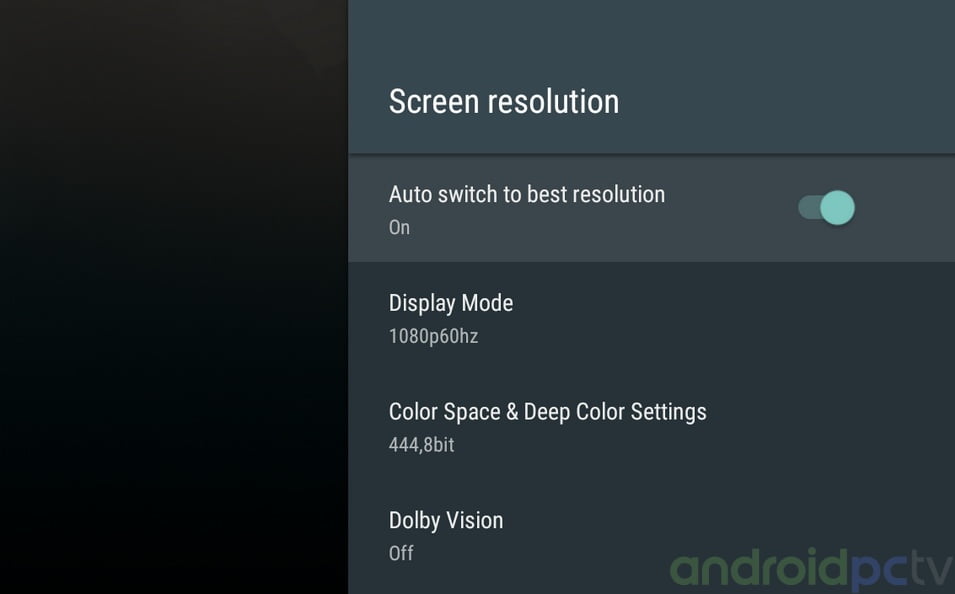
Inside the HDMI settings we find a control to choose the format and depth of color in detail, something that we will do well to adjust with respect to our TV, for example we can put RGB mode for old screens.

DLNA and Miracast
Installed in the MECOOL M8S PRO L we can share the screen using the AirPlay and Miracast apps and we have NO problem using a Smartphone LG G6, as we know this type of connections depends on many factors, with this app we can use Miracast and AirPlay.

We can use the DLNA service to access the multimedia content that we have in our device easily using an app like BubbleUPnP from an Android mobile or from a PC with Windows file explorer.

Webcam
We test the device for videoconferencing with the MECOOL M8S PRO L we use Skype and we can do a video conference without any notable problems using a simple webcam Logitech C170, a model very compatible with Android.

NETWORK CONNECTIONS
Wi-Fi and Ethernet
Installed in the MECOOL M8S PRO L we have a b/g/n Wireless Wi-Fi Adapter and Gigabit 10/100 chip, with which we have connected with an ASUS RT-AC1200G+ Router, a mid range device. We transferred files over a SAMBA network connected through 2.4 Ghz Wi-Fi and achieved a speed of about 28 Mbps in the 5GHz Wifi band we have 41 Mbps. This model has a Gigabit 10/100 connector with which we used a Category 6 network cable to guarantee the max speed, using this connection we reach about 67 mbps which is a basic transfer speed. Pretty basic results in the line of the hardware that mounts this low-priced model.

We also ran tests on the network adapters for streaming using the iPerf measurement tool with which we have the maximum connection speed in each type of network. With this figure we have how far we can reach using the available connections, the final performance will depend on our internet provider, the contracted speed, the distance of our Wi-Fi network and other factors. The results are the normal ones of this type of adapters, quite limited but enough to see Netflix 4K contents that ask for at most 20 Mbps.
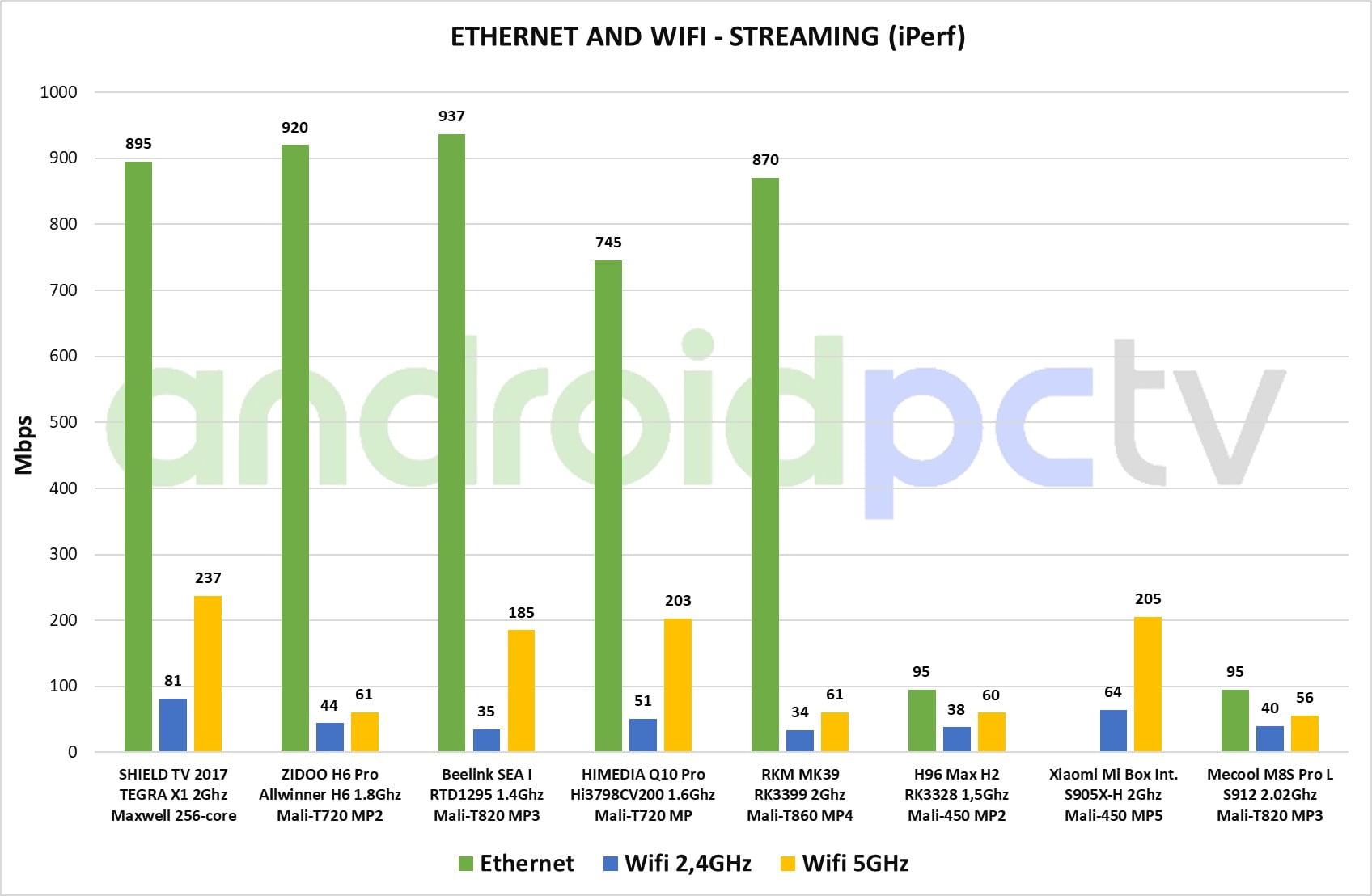
During the Wi-Fi coverage tests with the device located at a distance of about 16 ft as always and with a wall in between we verified that we have connection without cuts, the signal reaches a level of about 55 dBm a low result.

Bluetooth
The MECOOL M8S PRO L has a Bluetooth 4.1 adapter that works normally and we have been able to connect compatible devices without much inconvenience. As we see we have connected the RemoterATV3 control, which is the one that comes by default. We can synchronize the remote controller pressing the Volume – and OK keys simultaneously.

CONTROL SYSTEMS
Remote control
The MECOOL M8S PRO L can be purchased with a Bluetooth remote that also integrates an IR transmitter to use it in a conventional way if we do not pair it. In the upper area we have the microphone and the Google Assistant button, a status LED that indicates when we perform some action, crosshead, OK button, back, home, menu and volume controls. We can synchronize the remote by pressing the Volume – and OK keys at the same time.
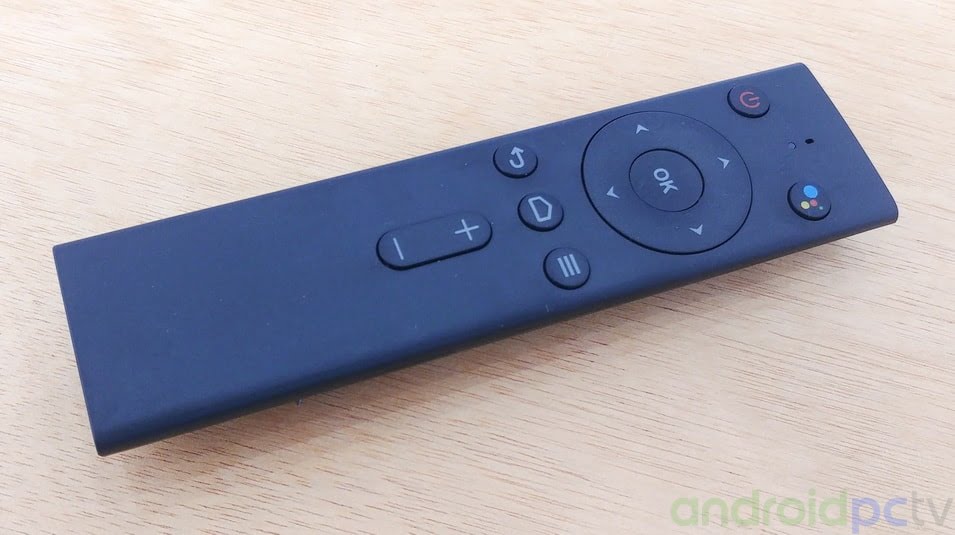
Within the settings menus we also have the possibility to activate HDMI CEC to be able to use the control of our TV with the TV-Box itself, a system that gives varied results depending on our TV models.

Remote control app
By default in the MECOOL M8S PRO L we have the option of using the Android TV Remote Control app that we can install and synchronize from Google Play. As alternative we can use the alternative CetusPlay to control it from our mobile or tablet, we only need to install the server in our TV-Box and the client app in or desired device.

Gamepad and games
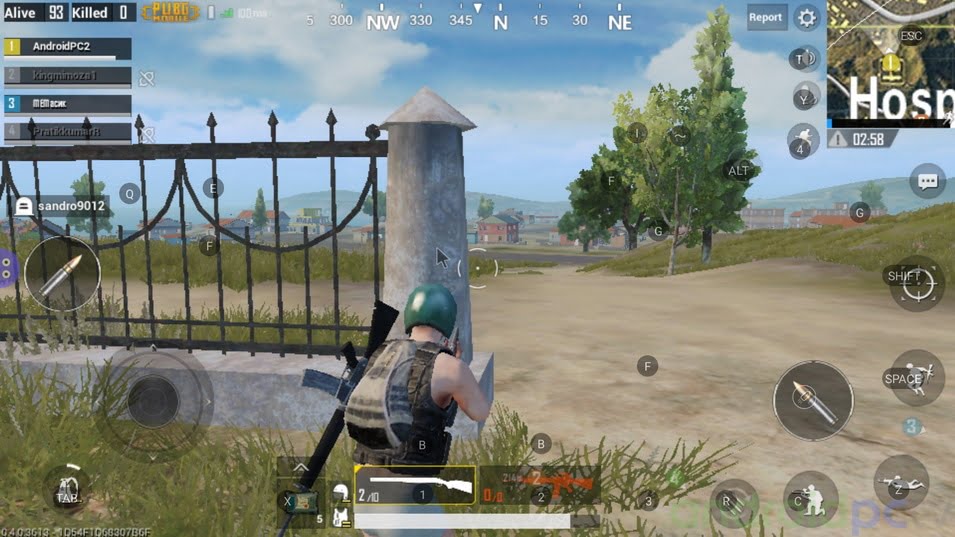
We can control games on the MECOOL M8S PRO L connecting a Gamepad with cable or bluetooth that work without problems, we can use this control in the games with this type of support, in general we will not have problems with conventional PC control. We can use them in games with this type of support, in general we will not have problems with conventional PC controls. With the Mali-T820MP3 GPU that incorporates this SoC the performance is quite good and we can play titles like PUBG Mobile, but we must take into account the temperature that can reach the box.
PERFORMANCE TEST
SOC
In the hardware installed on the MECOOL M8S PRO L we have the Amlogic S912 SoC that includes eight ARM Cortex-A53 64bit processors and a powerful GPU Mali-T820MP3. This is a low-cost SoC that works between 100 MHz and 1.51GHz (although theoretically it reaches 2 GHz) depending on the performance needs of the system. This SoC incorporates hardware decoding support for the H.265 video codec, 10-bit H.265 and is capable of playback video at 4K@60fps. In the performance tests as we can see we have good figures in the line of similar products.


Benchmarks
Antutu
With this famous test we get an idea of the general performance of the device and we can compare it with others. Since this tests changes a lot of scale we can not use it in our graphics.

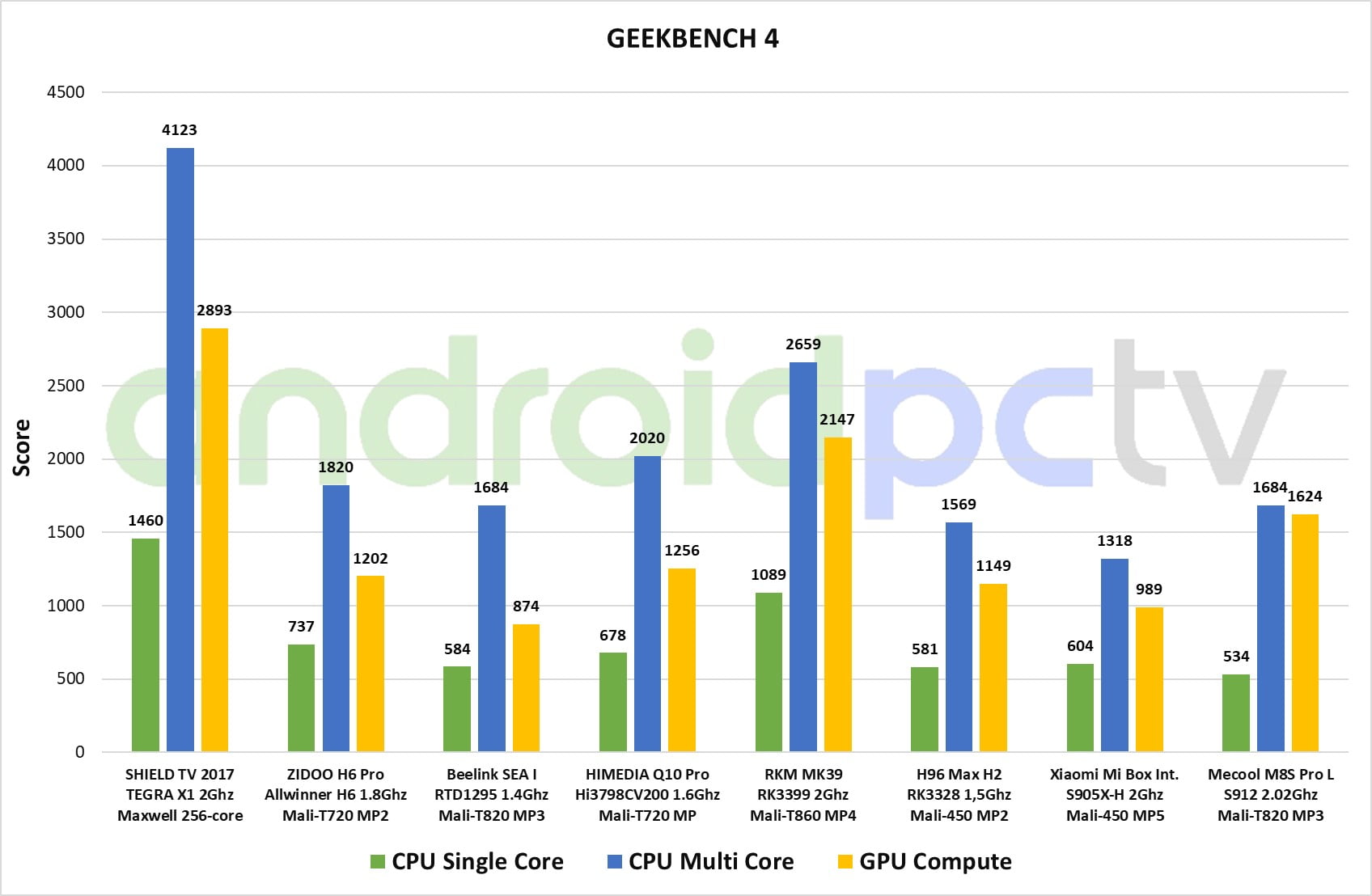
A new benchmark in SoC testing that offers fairly reliable numbers of CPU’s working in a single core or multiple cores ate the same time, it also has a section of GPU computing that gives us an overall result of the processing capacity.
3Dmark
The graphical performance test par excellence with a fairly solid continuity in the results which helps us to compare the performance of GPU’s historically.

PCMark
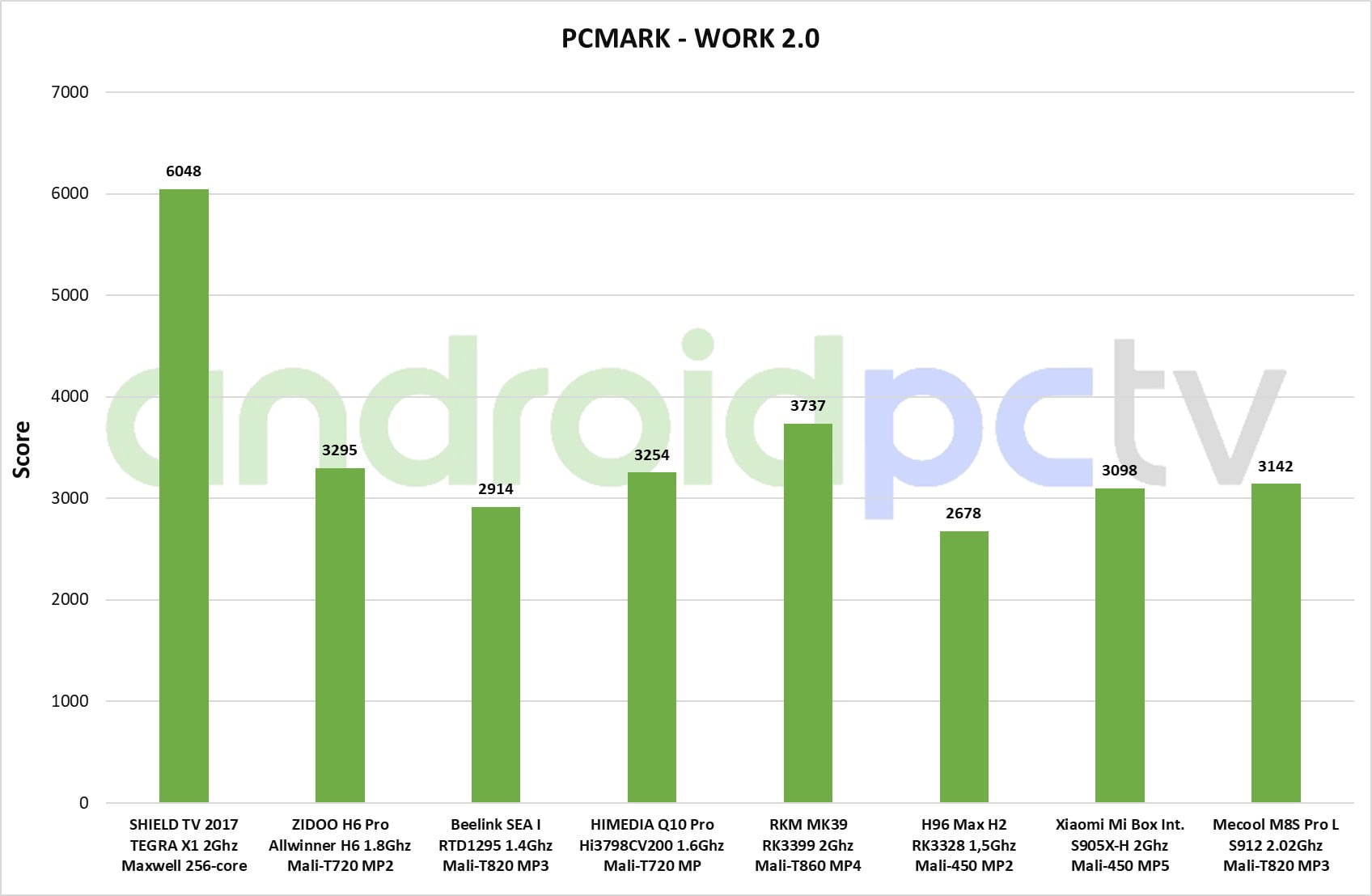
This benchmark tests the device in various scenarios of image processing, web browsing and other everyday uses of our device, the results are useful to check if you defend well in these areas.
VIDEO AND AUDIO TEST
Video format test
We perform the usual video playback tests in the MECOOL M8S PRO L, in this TV-Box we have the SoC Amlogic S912 that gives us positive results in general. It is possible to reproduce the most common files without major problems in native resolution in a fluid way. We can watch videos at resolutions in 4K@60fps format encoded with the h.265 codec, this SoC also supports HDR modes and 10 bit color files an option seems to work in the native player and KODI, all without performance problems thanks to the 3 GB of RAM and the Octa core processor.
- This model is compatible with LibreELEC as we have checked using our LibreELEC a quick installation guide.
- Tutorial: Playback 4K videos with HEVC and VP9 seamlessly on Android and Windows
- Tutorial: How to install an add-on in KODI in a simple way
- Tutorial: Judder in video playback, what is and how to fix it in Android or Windows

Test results
| H.264 format | Default player | KODI |
| BBB – H.264 8bit – 1080p@25fps – 7 Mbps | Correct | Correct |
| Birds – H.264 8bit – 1080p@24fps – 40 Mbps | Correct | Correct |
| Samsung Oceanic Life – H.264 8bit– 1080p@30fps – 40 Mbps | Correct | Correct |
| Anime – H.264 10bit – 1080p@24fps – 10 Mbps | Artifacts | Frame skip |
| Skyfall – H.264 8 bit – 4K@24fps – 10 Mbps | Correct | Correct |
| Timelapse – H.264 8bit – 4K@24fps – 43 Mbps | Correct | Correct |
| H.265 format | ||
| Tears of steel – HVEC 8bit – 1080p@24fps – 17 Mbps | Correct | Correct |
| Beauty – HVEC 8bit – 4K@120fps – 12 Mbps | Correct | Correct |
| Anime – HVEC 10bit – 1080p@24fps – 21 Mbps | Correct | Correct |
| Samsung UHD Dubai – HVEC 10bit – 4K@24fps – 51 Mbps | Correct | Correct |
| HDR format | ||
| Life of Pi HDR – HVEC – 4K@24fps – 45 Mbps | Correct | Frame skip |
| TravelXP HDR HLG – HVEC – 4K@24fps – 20 Mbps | Incompatible | Incompatible |
| Planet Earth II – HDR HLG – HVEC 10L5 – 4K@25fps – 31 Mbps | Correct | Correct |
- The MKV, Blu-ray ISO and BDRemux formats are only containers, inside we can have different codecs, resolutions, audio channels, chapters or subtitles. To play the Blu-ray format menus we need KODI or a compatible program.
Audio format test
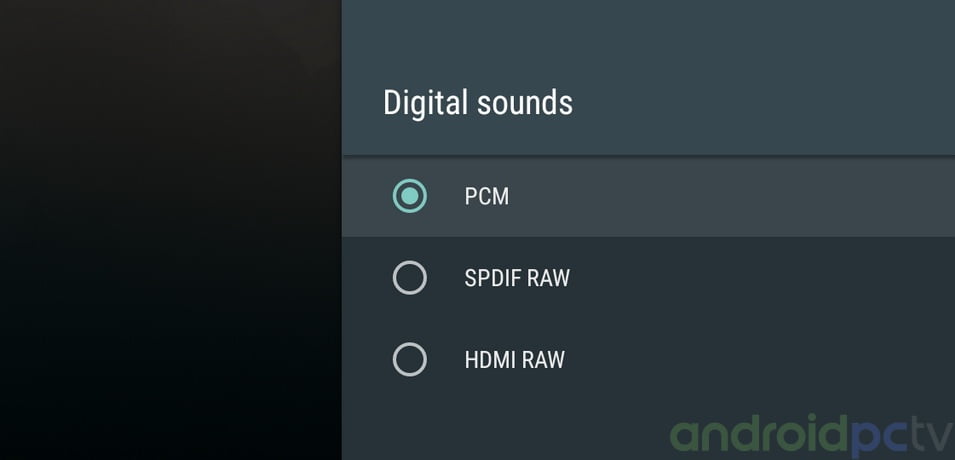
In the MECOOL M8S PRO L we have the Amlogic S912 SoC Octa core that as we know it is NOT licensed for the use of audio pass through for DD and DTS. For the sound tests we use our Yamaha RXV-577 AV receiver and we naturally check that in the device we have audio pass through for DTS and DD5.1 although in some 7.1 formats we have noticed audio errors.
Test results
| Formato audio | PCM* | HDMI | Optical |
| Dolby Digital 5.1 | Correct | Correct | – |
| Dolby Digital Plus 7.1 | Correct | Correct | – |
| Dolby True HD 7.1 | Correct | Cuts | – |
| Dolby Atmos 7.1 | Correct | PCM * | – |
| DTS 5.1 | Correct | Correct | – |
| DTS-HD Master Audio 7.1 | Correct | Core | – |
| DTS-HD High Resolution 7.1 | Correct | Cuts | – |
| DTS-X 7.1 | Correct | Core * | – |
- PCM – Stereo downmix from DD or DTS
- Core – Only the core of the format Dolby / DTS is played
- * Our AV receiver does not support these native formats but we check that it does downmix fine
WEB NAVIGATION AND STREAMING
Navigation
Using the MECOOL M8S PRO L we can navigate in a quite good way opening a good number of tabs, something normal since it includes 3 GB of RAM DDR3 and manages them quite well. The contents that are reproduced in HTML5 do not have major problems with the included default browser which has a good general compatibility, we can install the browser that we like.

DRM
At the level of DRM certificates needed for some payment Streaming apps we have Google Widevine L1 installed by default as is common in this family of products, we also have the HDCP 1.x certificate required to watch Netflix HD and other services.

Youtube and streaming apps
We installed some of the most common Streaming apps to watch TV online that we downloaded from the Play Store, we don’t have problems. This TV-Box can play Youtube up to 2160p without any problems with the version installed from Google Play.

Streaming services with subscription
We do our battery test as usual on the most popular streaming services to verified if can work correctly, the power of this device is more than enough to see any type of content on this services, although as we know we are limited on the streaming quality for the restrictions of each company. In this model we have the option to watch Netflix FullHD thanks to Widevine L1 certificates, HDCP protection and Android TV system, model Banned.
- NOTE: We remind that these TV-Box do not have official support for these streaming apps, the compatibility with these services can vary depends of any new limitations imposed for this companies. The tests are perform with the indicated firmware and the version of the streaming app at the date of the review.
| Streaming service | Video | Audio | Performance |
| Netflix | SD (480p) | Stereo | Correct |
| Amazon Prime Video | SD (480p) | Stereo | Correct using Nexus Firmware (not Android TV) |
| HBO nordic | FullHD (1080p) | Stereo | Correct using Nexus Firmware (not Android TV) |
- You can consult our guides where we explain in detail all the most known streaming services, what are their limitations in each platform and how to configure them to see content in HD or 4K quality if possible.
- Guide for Netflix on Android, inside you can found a solution for Error 0013 and installation method on rooted devices
- Guide for Amazon Prime video on Android

CONCLUSIONS
Opinion
As we see the TV-Box MECOOL M8S PRO L offers us a product that continues the line of this family of devices, we have the option of watching Netflix FullHD that this time is accompanied with a Bluetooth remote control with microphone and the Android TV system by default. An ideal environment to use Google Assistant if we like to launch searches by voice or use it to manage the TV-Box, this is undoubtedly the most positive aspect of the device.
On the other hand the MECOOL M8S PRO L has a somewhat poor hardware in other aspects, in one side stands out for his Amlogic S912 Octa core processor and its 3 GB of RAM, on the other hand we have a very poor Wi-Fi coverage and network adapter only 10/100, they are enough to see 4K content by streaming but they could be better. A controversial aspect is the temperature reached by the box, if we are going to play a lot with the box or have it locked up it is possible that we have some performance problem, but for a normal use of multimedia playback we have not noticed anything bad. In general, as we see a powerful TV-Box with many options for streaming.
- You can compare this device with our Recommended Android TV models
Where to buy
|
